
To analyze an MCAP robot recording with an AI agent, register Hindsight as an MCP server in Claude Code, Codex or Cursor, open the recording, and ask the agent why the run went wrong. Hindsight indexes the MCAP file (the robotics recording format Cerulion writes) on your machine and answers with a debrief, a list of anomalies and the moment the run went sideways, each cited to a real topic and timestamp you can check against the messages.
The server needs no model and no cloud credentials; your MCP client runs the agent loop. Hindsight is in early access and is not open source. Recording and replay stay in the open-source Cerulion CLI: cerulion bag record, cerulion bag play and cerulion bag play --resim all --verify work without it.
claude mcp add --transport stdio hindsight -- hindsight mcpWhat you need
- The
hindsightbinary on your PATH. Hindsight has no public download. Request access through the Hindsight page on the docs site, bring a recording of a run that went wrong, and the team sets you up. Check the install withhindsight --version. - An MCAP recording. Hindsight reads
.mcapfiles only. Convert a ROS 1.bagor a ROS 2.db3first with the mcap CLI:mcap convert recording.bag recording.mcap. A Cerulion recording fromcerulion graph run --record,cerulion bag recordor a Flashback capture is already MCAP. - An MCP client. Claude Code, Codex, Cursor and Claude Desktop all speak the Model Context Protocol over stdio, which is how the server runs. The commands and files below were checked on 2026-10-30 with Claude Code 2.1.314, Codex CLI 0.164.0 and
hindsight 0.1.1; the Cursor file follows the format the docs show for Cerulion's other MCP server and was not opened in Cursor.
The index lives next to the bag. Hindsight writes <bag>.duckdb and a zero-byte <bag>.duckdb.lock beside the recording, so the folder must be writable, and it reuses the index while the bag is unchanged. The first open of a multi-gigabyte bag takes one to two minutes; if your client has a short tool timeout, raise it.
Choose your MCP client
How do I connect Hindsight to Claude Code?
Register the server once, then confirm it connects.
claude mcp add --transport stdio hindsight -- hindsight mcp
claude mcp listhindsight: hindsight mcp - ✔ ConnectedHow do I connect Hindsight to Codex?
The Codex CLI writes the entry for you:
codex mcp add hindsight -- hindsight mcp
codex mcp listName Command Args Env Cwd Status Auth
hindsight hindsight mcp - - enabled UnsupportedThat command adds this block to ~/.codex/config.toml, which you can also write by hand:
[mcp_servers.hindsight]
command = "hindsight"
args = ["mcp"]
Auth: Unsupported means the server has no sign-in step; it reads local files.
How do I connect Hindsight to Cursor?
Add the server to .cursor/mcp.json in your project, or to the global file in Cursor's MCP settings. GUI clients such as Cursor, Claude Desktop and VS Code do not inherit your shell PATH, so give them the absolute path that command -v hindsight prints, and set HINDSIGHT_BAG_DIR to your recordings folder so open_bag with no argument finds a bag.
{
  "mcpServers": {
    "hindsight": {
      "command": "/opt/homebrew/bin/hindsight",
      "args": ["mcp"],
      "env": {
        "HINDSIGHT_BAG_DIR": "/Users/me/robot/recordings"
      }
    }
  }
}
The same block, with "type": "stdio" added, is what Claude Desktop reads from claude_desktop_config.json, and what VS Code reads under a top-level servers key in .vscode/mcp.json.
Which tools can the agent use?
The server gives the agent these tools. All of them are read-only except open_bag, which writes the index beside the bag.
| Tool | What it does |
|---|---|
open_bag | Opens a recording and builds its index on first open. |
get_debrief | Returns the deterministic summary and the went-sideways time. |
find_anomalies | Lists the detected anomalies, worst first, with their log times. |
scrub | Shows per-second signals for chosen topics in a time window. |
query_index | Runs a read-only SQL SELECT over the index. |
sample_messages | Returns the messages on a topic nearest a timestamp. |
list_topics | Lists what was recorded. |
get_foxglove_link | Turns a cited moment into a Foxglove link, when the bag has a public URL. |
That is the table from the docs. A tools/list request to hindsight 0.1.1 over stdio returned those eight and one more, compare_to_baseline, which finds the first message on a topic whose payload differs from a known-good recording of the same run.
Then ask, in a session started in the folder that holds the recording:
Open the recording in this folder and tell me when the run went sideways and why.
open_bag with no argument finds a single .mcap under the current directory, or under HINDSIGHT_BAG_DIR when that is set, and lists the candidates when there are several.
A worked investigation of a sample MCAP recording
This is a real session against a 60-second recording of a Unitree Go2 quadruped, captured with the Cerulion recorder: three topics, the robot's 500 Hz low-level state, its vendor odometry and a deskewed point cloud. The tool output below is what Hindsight returned on 2026-10-30; nothing in it is edited except trimming. The recording's log clock started near the Unix epoch, so the absolute times are small; Hindsight cites them verbatim in nanoseconds either way.
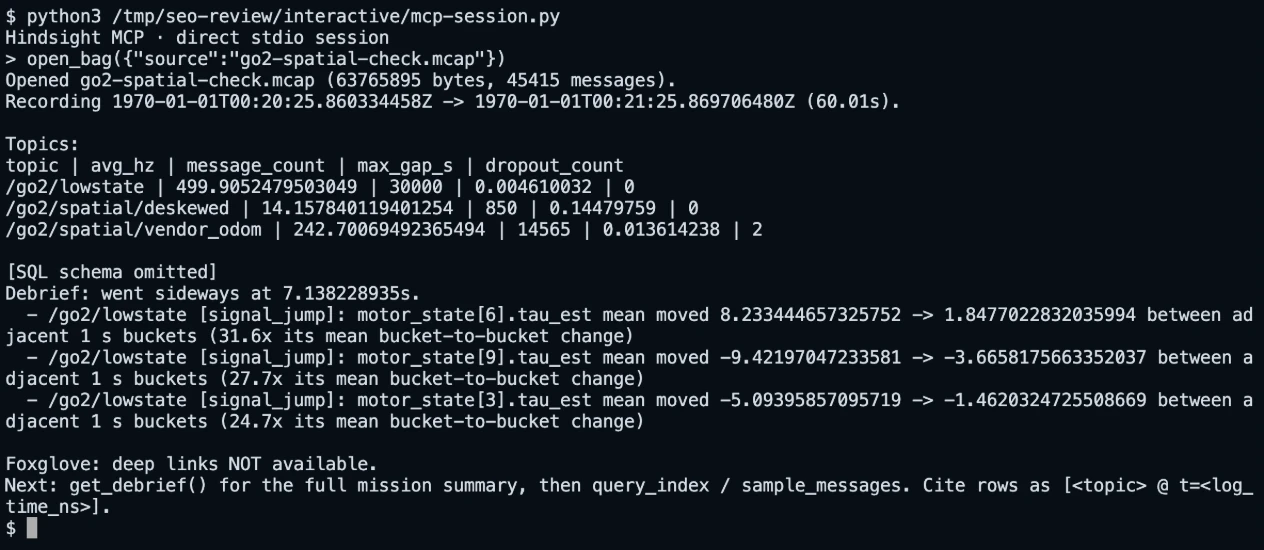
The agent starts with open_bag:
Opened go2-spatial-check.mcap (63765895 bytes, 45415 messages).
Recording 1970-01-01T00:20:25.860334458Z -> 1970-01-01T00:21:25.869706480Z (60.01s).

Topics:
topic | avg_hz | message_count | max_gap_s | dropout_count
/go2/lowstate | 499.9052479503049 | 30000 | 0.004610032 | 0
/go2/spatial/deskewed | 14.157840119401254 | 850 | 0.14479759 | 0
/go2/spatial/vendor_odom | 242.70069492365494 | 14565 | 0.013614238 | 2

Debrief: went sideways at 7.138228935s.
  - /go2/lowstate [signal_jump]: motor_state[6].tau_est mean moved 8.233444657325752 -> 1.8477022832035994 between adjacent 1 s buckets (31.6x its mean bucket-to-bucket change)
  - /go2/lowstate [signal_jump]: motor_state[9].tau_est mean moved -9.42197047233581 -> -3.6658175663352037 between adjacent 1 s buckets (27.7x its mean bucket-to-bucket change)
  - /go2/lowstate [signal_jump]: motor_state[3].tau_est mean moved -5.09395857095719 -> -1.4620324725508669 between adjacent 1 s buckets (24.7x its mean bucket-to-bucket change)
Seven seconds in, the tau_est field (the motor's torque estimate) on three leg motors dropped to a fraction of its value inside one second. get_debrief returns the same findings as JSON, with the first one at "log_time_ns": 1232998563393 on /go2/lowstate, and a dropout on /go2/spatial/vendor_odom at 1237321142178 further down the list.
To see the shape of the drop rather than one bucket, the agent runs query_index over the per-second signal table:
SELECT bucket_ns, n, round(mean, 3) AS mean, round(last, 3) AS last, last_log_time_ns
FROM signals
WHERE topic = '/go2/lowstate' AND field = 'motor_state[6].tau_est'
  AND bucket_ns BETWEEN 1229000000000 AND 1235000000000
ORDER BY bucket_nsbucket_ns | n | mean | last | last_log_time_ns
1229000000000 | 500 | 8.906 | 8.906 | 1229998858254
1230000000000 | 500 | 8.911 | 8.906 | 1230998719715
1231000000000 | 500 | 8.233 | 5.022 | 1231998479737
1232000000000 | 500 | 1.848 | 5.319 | 1232998563393
1233000000000 | 500 | 1.69 | 1.608 | 1233998666927
1234000000000 | 500 | 1.272 | -0.891 | 1234998423895
1235000000000 | 500 | 1.597 | -0.767 | 1235998961635Motor 6 held a steady 8.9 for the first seconds, fell within the bucket that ends at 1232998563393, and stayed low. sample_messages turns that bucket time into messages the agent can cite:
topic | log_time_ns | sequence | summary
/go2/lowstate | 1232994565161 | 195606 | NULL
/go2/lowstate | 1232996328588 | 195607 | NULL
/go2/lowstate | 1232998563393 | 195608 | NULL
/go2/lowstate | 1233000408230 | 195609 | NULL
/go2/lowstate | 1233002366513 | 195610 | NULL
The answer the agent wrote from those rows: the run went sideways at 7.14 s, when the torque estimates on motors 6, 9 and 3 collapsed within one second [/go2/lowstate @ t=1232998563393], with the vendor odometry dropping two intervals four seconds later [/go2/spatial/vendor_odom @ t=1237321142178]. What the recording cannot show, it says so: there is no command topic in this bag, so whether the controller asked for the unload or the legs lost contact is not in the evidence. Every number above is one the agent can be checked against, which is the point of the citation.
How do I debug a ROS 2 robot failure with Claude?
The loop is record, ask, fix, check. Cerulion runs a ROS 2 Jazzy stack through rmw_cerulion, so the same recording, Flashback and replay tools apply to ROS 2 nodes.
- Run the stack through Cerulion, or attach to it. When you control startup, keep your launch file:
cerulion ros2 launch my_robot_bringup camera.launch.py, orcerulion ros2 run my_robot_drivers imu_nodefor one executable. Your nodes keep their ROS 2 APIs and executors. When the stack is already running,cerulion ros2 attach --iface <local-interface-IP>discovers the existing DDS stack and bridges its topics without restarting the nodes. - Let Flashback capture the failure. Every running graph keeps a memory-bounded window of recent activity. The runtime writes that window to MCAP on its own when a worker process dies, a node is disabled after repeated panics, the e-stop is engaged, a topic stalls while its process stays alive, or a topic's rate collapses. You can also ask for one from another shell on the robot:
cerulion flashback --note "controller stopped late". Captures land inrecordings/flashbacks/. - Ask the agent. Open the capture with Hindsight and ask what went wrong and when. For the live robot, Cerulion's other MCP server gives Claude Code, Codex and other clients tools for graphs, nodes, topics, robots, recordings, Flashback and replay verification, so the agent can inspect live data, rebuild a node and re-run a captured recording. The README registers both hosted endpoints with a Cerulion account:
claude mcp add --transport http cerulion https://mcp.cerulion.com/mcp/cerulion
claude mcp add --transport http hindsight https://mcp.cerulion.com/mcp/hindsight
Those commands use the names cerulion and hindsight. Claude Code keeps one server per name in a scope and answers MCP server hindsight already exists to a second, so if you registered the local server as hindsight above, give the hosted one another name, such as hindsight-cloud, or remove the local one first with claude mcp remove hindsight. The rest of this page uses the local server on a recording you have on your machine. The hosted endpoints need a Cerulion account; the docs describe the hosted Cerulion server as Cloud instance tools plus analysis of bags at https:// URLs, with no local workspace tools.
- Check what the fix changed with replay. For native Cerulion nodes,
cerulion bag play BAG --resim all --verifyre-executes the graph against the recorded inputs and compares every output with the recording byte for byte, so it answers one question: does the current code reproduce the recorded run? Exit 0 means it does. Exit 1 means output diverged. The report names the topic and violation class; tolerance failures also name the field and worst frame. Exit 6 means the schedule diverged. Run it on the failure capture after a fix and expect exit 1 where the fix changed behavior; the violation block names the affected topics and available frame details, and that is the evidence to review, as the README's quickstart shows when a changed controller fails verification against the same recording. A--tolerancedocument accepts differences you intend. Record the fixed run, and that new recording becomes the baseline for CI, where exit 0 means the behavior stayed put. A ROS 2 process launched from aros2:entry is not respawned by re-execution; its topics are recorded inputs, and aros2 attachbag can be played back but not re-executed. The replay-in-CI guide has the exit-code table and a GitHub Actions job.
Not shipped yet, per the public roadmap: first-class Python and C++ node authoring, a pull-request reviewer that runs recorded regressions, and Windows support.
Questions engineers ask
Is Hindsight open source? No. It is in early access by request. The Cerulion runtime, recorder and replay verifier are open source under AGPL-3.0-only, with a commercial license available.
Does the server send my recording to a model? The MCP server needs no model and no cloud credentials. It indexes the bag on your machine and answers tool calls; your client, such as Claude Code, is what runs the model and the agent loop.
Which recordings can it read? MCAP only. Convert ROS 1 .bag and ROS 2 .db3 files with mcap convert. It reads only the topics you recorded, so record the topics you want to investigate.
Can Studio do this without an MCP client? Yes. Cerulion Studio has a Hindsight screen that indexes a bag and shows the moment the run went sideways, and its agent dock answers questions with the same tools and refuses an answer it cannot ground. Studio looks for the hindsight binary on your PATH and in the usual install folders.
How big a bag can it handle? The docs state the cost, not a limit: indexing a multi-gigabyte bag takes one to two minutes on the first open, and the index is reused while the bag is unchanged.
Sources
The commands, tool list, file formats and limits on this page come from docs.cerulion.com (Hindsight, Connect an MCP client, Record and replay a run) and the README of the public repository cerulion-inc/cerulion (Flashback, Bring your ROS 2 stack, Give your agent access to the robot, Roadmap, License). The Claude Code, Codex and tools/list output and the worked investigation were captured on 2026-10-30 with the versions named above.