
To replay an MCAP recording in CI with Cerulion, run cerulion bag play BAG --resim all --verify in a job step and let the job fail on a non-zero exit code. Cerulion re-executes the recorded graph against the recorded inputs on the recording's own clock, compares every produced frame with the recording byte for byte, and exits 0 when they match, 1 when output data diverged, and 6 when the execution schedule diverged.
This works for recordings Cerulion made: a cerulion graph run --record recording, a Flashback capture, or a cerulion bag record --run attach. The recording is a standard MCAP file, so it can also be read by MCAP tools; re-execution and the verdict are what the Cerulion CLI adds. A rosbag or any other MCAP file that Cerulion did not record is not a supported input for --resim.
cerulion bag play recordings/baseline.mcap --resim all --verify --report replay-report.jsonWhat do I need before the first CI run?
Three things have to be in the repository the job checks out.
-
The workspace. Re-execution loads your current node builds, so the job needs the node sources and the graph YAML, exactly as
cerulion graph rundoes. Plain playback needs no workspace; re-execution does. If you copy the obstacle-avoidance example out of a clone ofcerulion-inc/cerulion, itsCargo.tomlstill pointscerulion_coreandnative_ros2_messagesat../../crates/, which only exist in that clone. Replace both path entries under[workspace.dependencies]with the published crates, pinned to the CLI release, and commit the regeneratedCargo.lock. Addtarget/to the copy's.gitignoretoo: in the clone, the repository root's.gitignorecovers the build folder, and without itgit add .stages more than a gigabyte of build output.[workspace.dependencies] cerulion_core = "=1.0.0" native_ros2_messages = "=1.0.0" -
A replay-grade recording. Record the baseline with
cerulion graph run <graph> --record. The bare flag writes into./recordings/, and the run prints the path,recordings/<graph>_<timestamp>.mcap. A Flashback capture is also replay-grade and says so itself. A standalonecerulion bag recordcarries frames and no scheduler trace, so--resimrefuses it with exit 2. Commit the recording next to the code, or fetch it from your artifact store in a step before the replay. The example's.gitignorelistsrecordings/, sogit add .skips the file without a message, andgit add recordings/baseline.mcaprefuses it. Copy the recording your run printed torecordings/baseline.mcapand stage it explicitly withgit add -f recordings/baseline.mcap. -
The compiler that built the CLI. A node is a shared library loaded into the CLI's own process, and the loader refuses a node built by a different
rustc. The install script installs that compiler (Rust 1.93.0 for the 1.0.0 binaries). On a runner whose default toolchain is newer, name it withRUSTUP_TOOLCHAIN. Pin the release and the compiler together: the installer takes--version v1.0.0, the same way the README passessh -s -- --uninstall, so a newer release cannot arrive with a different compiler while the toolchain pin still says 1.93.0. When you move to a newer release, change both lines.
Cerulion commands run under an account; cerulion login prints a short code to approve from a browser, which no unattended job can do. The public repository's own replay workflow, .github/workflows/examples-replay.yml, sets CERULION_LOGIN_GATE: "off" so the job runs without an account. The workflow below does the same, and names that file as its source.
How do I replay an MCAP recording in GitHub Actions?
The job installs the CLI with the one-line installer from the README, builds the nodes, replays the baseline recording with --verify, and keeps the JSON verdict as an artifact. Save it as .github/workflows/replay.yml at the repository root. As written, it runs in examples/obstacle_avoidance, where the example sits in a clone of cerulion-inc/cerulion. If your workspace is at the repository root, set working-directory to . and the artifact path to replay-report.json; for any other folder, change both to that folder. The upload step needs the full path because uses: steps resolve paths from the repository root, not from working-directory. Replace the two node names with the nodes in your graph and recordings/baseline.mcap with your recording.
name: Replay regression

on:
  pull_request:
  push:
    branches: [main]

permissions:
  contents: read

jobs:
  replay-verify:
    runs-on: ubuntu-latest
    timeout-minutes: 30
    defaults:
      run:
        # The folder that holds your Cerulion workspace. Use . for the repository root.
        working-directory: examples/obstacle_avoidance
    env:
      # The compiler that built the 1.0.0 CLI binaries (README, Install).
      # Change it together with the --version pin in the install step.
      RUSTUP_TOOLCHAIN: "1.93.0"
      # What cerulion-inc/cerulion's own examples-replay.yml sets so a job
      # runs without an interactive `cerulion login`.
      CERULION_LOGIN_GATE: "off"
    steps:
      - uses: actions/checkout@v4

      - name: Install the Cerulion CLI, pinned to the release the compiler pin matches
        shell: bash
        run: |
          curl -fsSL https://raw.githubusercontent.com/cerulion-inc/cerulion/main/tools/scripts/install.sh | sh -s -- --version v1.0.0
          echo "$HOME/.local/bin" >> "$GITHUB_PATH"
          echo "${CARGO_HOME:-$HOME/.cargo}/bin" >> "$GITHUB_PATH"

      - name: Build the nodes
        shell: bash
        run: |
          cerulion --version
          cerulion node build laser_scanner --release
          cerulion node build safety_controller --release
          cerulion graph validate obstacle_avoidance

      - name: Replay the baseline recording and verify every output
        shell: bash
        run: |
          ulimit -n 65536 || true
          cerulion bag play recordings/baseline.mcap --resim all --verify --report replay-report.json

      - name: Keep the verdict
        if: always()
        uses: actions/upload-artifact@v4
        with:
          name: replay-report
          # The same folder as working-directory, from the repository root.
          path: examples/obstacle_avoidance/replay-report.json
          if-no-files-found: ignore
Two details come from the public repository's own workflow. shell: bash opts a step into bash -eo pipefail, so a non-zero exit inside a pipeline still fails the step; on the install step, a failed download then fails the step instead of piping nothing into sh. ulimit -n 65536 || true raises the file-descriptor ceiling that iceoryx2 shared memory can run into, and stays harmless where the raise is refused.
The replay step needs nothing else to gate the build. --verify exits non-zero on divergence, and a non-zero exit fails the step. The --report file is the same verdict in JSON, with passed and violations fields, written for machines; the verdict is always printed to stderr as well.
What does each exit code mean?
Same recording. One code change.
coordination: lockstep
read log: verified clean (1 edge(s) compared)
replay PASS: recordings/obstacle_avoidance_20261030T224514Z.mcap (367 tick(s) replayed, 2/2 topic(s) matched byte-for-byte and were credited)
Verbatim excerpts from the local runs below, with timing added for reading. This explorer switches between captured results; it does not run Cerulion in your browser. Comparison is byte-exact. See the tolerance guidance below for field-level comparisons.
--verify applies a stable exit contract. Without --verify, a bare --resim all re-executes, makes no claim about matching the recording, and exits 0 on any completed run.
| Exit | Meaning | What to do |
|---|---|---|
| 0 | Every compared frame matched the recording. The run prints replay PASS. | Nothing. The change reproduced the recorded behavior on these inputs. |
| 1 | Output data diverged, or a field passed its tolerance. The report names the topic, the class and, for a tolerance, the field and the worst frame. | Read the violation block. Decide whether the new output is the intended change or a regression. |
| 2 | Bag I/O failed, or the bag is not replay-grade. | Check the path, and check cerulion bag info for whether the bag can be re-executed. |
| 3 | A node library failed to load, or a node panicked. | Rebuild with the compiler that built the CLI, or fix the panic. |
| 4 | The tolerance YAML failed validation. | Fix the key, parameter, topic or field the error names. The file is checked before any node loads. |
| 5 | Internal error. | Report it with the log. |
| 6 | The execution schedule diverged from the recorded trace. | The nodes fired in a different order or count. Look for a change in trigger policies, periods or wiring. |
Exit 7 means the command needs a sign-in and is not a replay verdict. In the perception example's runbook that is the code to expect when the login gate is on and no account is present.
A pass ends with one line naming the bag, the ticks it re-executed and the topics it credited:
replay PASS: <bag> (<N> tick(s) replayed, <P>/<M> topic(s) matched byte-for-byte and were credited)A data violation prints a block instead. The class is one of missing-topic, extra-topic, missing-messages, extra-messages, byte-mismatch, record-side-tap-loss and tolerance-exceeded.
FRAME-CONTENT DIVERGENCE: <bag>
  <N> tick(s) replayed; <P>/<M> topic(s) matched and were credited; <V> violation(s):
  - <topic> [<class>]: <detail>
  Topics passed: <P>/<M>
How does deterministic replay verify the output?
Re-execution is not playback. cerulion bag play BAG republishes the recorded frames onto shared memory, wall-paced, so a viewer or a consumer node sees what a live robot would. cerulion bag play BAG --resim all re-executes the bagged graph's nodes against the recorded inputs instead, and recomputes every produced topic.
Three recorded facts make that re-execution deterministic. The recording carries the scheduler trace: which node fired at which step, on which clock. The scheduler computes dependency levels from the graph ahead of time and lets trigger policies decide when a node can run, so the recorded scheduling and input decisions can be replayed in the same order. And the re-execution loop never reads the wall clock; it runs on the recording's own virtual clock, as fast as possible, which is what lets a replay match the live run.
--verify then compares every re-executed frame with the recorded frame for the same topic and step. The comparison is byte-exact by default. A --tolerance document relaxes it per field, and only there: everything the document does not name stays byte-exact, so a drifting sibling field is still caught. The metrics are bit_exact, max_abs, max_rel, rmse, bbox_iou, set_equal, set_subset and ordered_list_equal. A NaN or an infinity never passes under any metric other than bit_exact.
A passing --verify is a statement about the recorded inputs: your current code, re-run against the inputs that reached the robot, produced the same bytes the robot produced. It is not a claim about every environment the robot could meet. That is why the recording to keep is the one from the run that mattered.
How do I turn a robot log into a regression test?
- Record the run.
cerulion graph run <graph> --recordwritesrecordings/<graph>_<timestamp>.mcapand finalizes it on Ctrl+C. Multi-process runs provision the scheduler-trace rings whether or not you asked to record, so a Flashback capture of a run nobody expected to go wrong can be re-executed too. - Verify the unchanged code.
cerulion bag play BAG --resim all --verifyon the baseline should printreplay PASSand exit 0. If it exits 2, the bag is not replay-grade;cerulion bag infosays why. - Add a tolerance only where behavior may legitimately differ. The perception example in the public repository judges a detector's
boxesbybbox_iouwithmin_iou: 0.5, itsscoresbymax_abswiththreshold: 0.05, and itsclass_idsbyset_equal. Pass the document with--tolerance tolerance.yaml. A document in which every metric resolves tobit_exacthas no effect, and the run warns that it has none. - Gate the pull request on the exit code. The workflow above fails the step on any non-zero exit. Keep the
--reportJSON as an artifact so a reviewer can read the verdict without the log. - Triage a divergence from the report. The violation block names the topic and the class. A
tolerance-exceededline names the field, the metric and the worst frame, for examplefield 'boxes' exceeded the bbox_iou tolerance on '/percepmin/detector/detections': worst value 0.42857142857142855 vs threshold 0.5 (worst at frame 0), which is the line the perception runbook shows for a detector whose boxes moved by eight pixels.
The README's quickstart is the smallest version of this loop. Record the obstacle-avoidance example, verify it, change the controller's clear-path velocity from 0.3 to 0.25, rebuild that node and verify against the same recording. The output below was captured on 2026-10-30 with the released cerulion 1.0.0 binary on macOS arm64, installed by the curl script into a scratch home with CERULION_LOGIN_GATE=off and RUSTUP_TOOLCHAIN=1.93.0, which is the same recipe as the workflow above. Log lines are cut; the verdict lines are verbatim. To follow along, install the CLI, open a new shell so it is on your PATH, then get the example at the same release, set the capture's two variables in that shell, and build the two nodes:
curl -fsSL https://raw.githubusercontent.com/cerulion-inc/cerulion/main/tools/scripts/install.sh | sh -s -- --version v1.0.0
git clone --depth 1 --branch v1.0.0 https://github.com/cerulion-inc/cerulion cerulion-starter-source
cd cerulion-starter-source/examples/obstacle_avoidance
# The compiler that built the CLI; the installer keeps your rustup default.
export RUSTUP_TOOLCHAIN=1.93.0
# The capture's account setting. Or run `cerulion login` once instead.
export CERULION_LOGIN_GATE=off
cerulion node build laser_scanner --release
cerulion node build safety_controller --release
Record about eight seconds, then stop the run with Ctrl+C:
cerulion graph run obstacle_avoidance --release --record --network off # Ctrl+C after 8 srecording written to recordings/obstacle_avoidance_20261030T224514Z.mcapBAG="recordings/obstacle_avoidance_<timestamp>.mcap" # the path your run printed
cerulion bag play "$BAG" --resim all --verify --report replay-pass.jsoncoordination: lockstep
read log: verified clean (1 edge(s) compared)
replay PASS: recordings/obstacle_avoidance_20261030T224514Z.mcap (367 tick(s) replayed, 2/2 topic(s) matched byte-for-byte and were credited)The shell reports exit code 0, and replay-pass.json starts with the verdict:
{
  "passed": true,
  "node_failures": [],
  "ticks_replayed": 367,
  "topics_checked": 2,
  "topics_passed": 2,
  "violations": [],
  "trace_divergence": null,
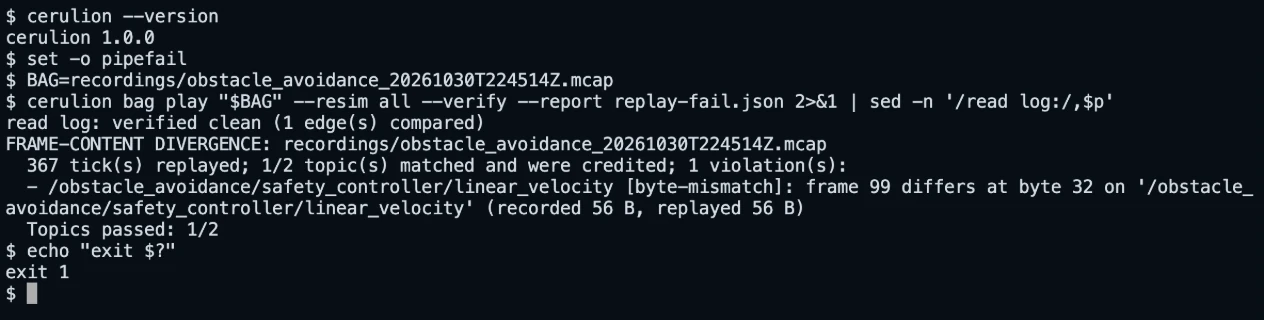
Now change else { 0.3 } to else { 0.25 } in nodes/safety_controller/src/lib.rs (the other 0.3 in that file is a comment), rebuild that one node and verify against the same recording:
cerulion node build safety_controller --release
cerulion bag play "$BAG" --resim all --verify --report replay-fail.jsonFRAME-CONTENT DIVERGENCE: recordings/obstacle_avoidance_20261030T224514Z.mcap
367 tick(s) replayed; 1/2 topic(s) matched and were credited; 1 violation(s):
- /obstacle_avoidance/safety_controller/linear_velocity [byte-mismatch]: frame 99 differs at byte 32 on '/obstacle_avoidance/safety_controller/linear_velocity' (recorded 56 B, replayed 56 B)
Topics passed: 1/2The shell reports exit code 1. The laser scan topic still matched, because the scanner did not change. The controller's velocity topic diverged at frame 99: on the same recorded scan, the changed controller produced different bytes. In replay-fail.json the same verdict reads "passed": false with one entry in violations whose class.kind is ByteMismatch, index 99 and first_diff_byte_offset 32. A reviewer reads that file from the artifact without opening the job log.
What replay verification does not cover
Re-execution covers native Cerulion nodes. A ROS 2 process launched from a ros2: entry in the graph is never respawned; its topics are recorded inputs, and the run warns which entries it skipped. Re-simulating a cerulion ros2 attach bag on a desk with no robot produces no output, because its bridge node still needs its external DDS inputs; use plain playback to view an attached ROS 2 recording.
Release binaries support Linux x86_64 and ARM64 (glibc 2.35 or newer) and macOS on Intel and Apple Silicon. The Linux packages carry the ROS 2 Jazzy rmw_cerulion that cerulion ros2 run and cerulion ros2 launch use; the macOS packages do not, because ROS 2 Jazzy has no macOS binaries. ubuntu-latest is the runner to start with. A recording made on a desk replays there too: an obstacle-avoidance baseline recorded on macOS arm64 passed byte for byte on ubuntu-latest x86_64. The CLI warns on such a replay that cross-architecture/OS replay: float/libm results MAY differ in ULPs. A node heavy in floating-point math can diverge across architectures without a regression, so record the baseline on the runner's architecture, or add a narrow tolerance for that field.
Items the public roadmap lists as next, not shipped: a pull-request reviewer that runs recorded regressions and reports behavioral differences, first-class Python and C++ node authoring, and Windows support. The workflow on this page is the part you run today.
Cerulion is licensed AGPL-3.0-only with a commercial license available; the client-side crates are MIT OR Apache-2.0.
Questions engineers ask
Does playing a bag back verify my code? No. Playback republishes recorded frames and loads no node, so it exercises consumers but makes no claim about your code. Only --resim all --verify re-executes the nodes and compares their outputs.
Can I verify a ROS 2 bag from another recorder? No. --resim needs the scheduler trace that cerulion graph run --record, a Flashback capture and a bag record --run attach carry. Record the run with Cerulion, through rmw_cerulion on ROS 2 Jazzy if your stack is ROS 2.
Does a passing replay mean the robot is safe? No. It means the changed code produced the same bytes on these recorded inputs. Keep recordings of the runs that mattered, including Flashback captures of failures, and verify against each of them.
Which install should the job use? The curl installer, because it also installs the matching Rust compiler. Homebrew and the Debian package do not provision Rust; after either, run cerulion-install-rust once.
Sources
Every command, flag, exit code and output format on this page comes from the public repository cerulion-inc/cerulion or docs.cerulion.com: the README (Install, Quickstart, Replay verification, Bring your ROS 2 stack, Flashback, Roadmap, License), docs/bag.md, docs/flashback.md, examples/perception/README.md, examples/perception/tolerance.yaml, .github/workflows/examples-replay.yml, and the docs guide Record and replay a run.