
A 1 MiB round trip between processes took 10,952 µs on ROS 2 Jazzy defaults and 4.08 µs on Cerulion, an open-source robot runtime with a zero-copy transport. That makes Cerulion about 2,700× faster than ROS 2 Jazzy defaults at 1 MiB, by median on one Linux x86-64 desktop at 100 Hz, recording on, Sep 2026.
This is ROS 2 latency for large messages, the kind your camera frames and lidar scans pay when they cross a process boundary. Cerulion's native nodes pass messages through zero-copy shared memory. Below are the chart, the mechanism, the rerun command and a trial that needs no robot.
- Cerulion's median round trip between processes stays flat, at 4.07 µs for 64 B and 4.43 µs for 16 MiB, on one Linux desktop, Sep 2026.
- Cerulion's multi-process default has a 4.08 µs median round trip at 1 MiB, where ROS 2 Jazzy composed into one process has 29.79 µs, on one Linux desktop.
- On
rmw_cerulion, Cerulion's bridge for ROS 2, Jazzy nodes using loaned messages have an 11.12 µs median round trip at 1 MiB, on one Linux desktop. A loaned message is one the publisher fills in memory the transport owns.
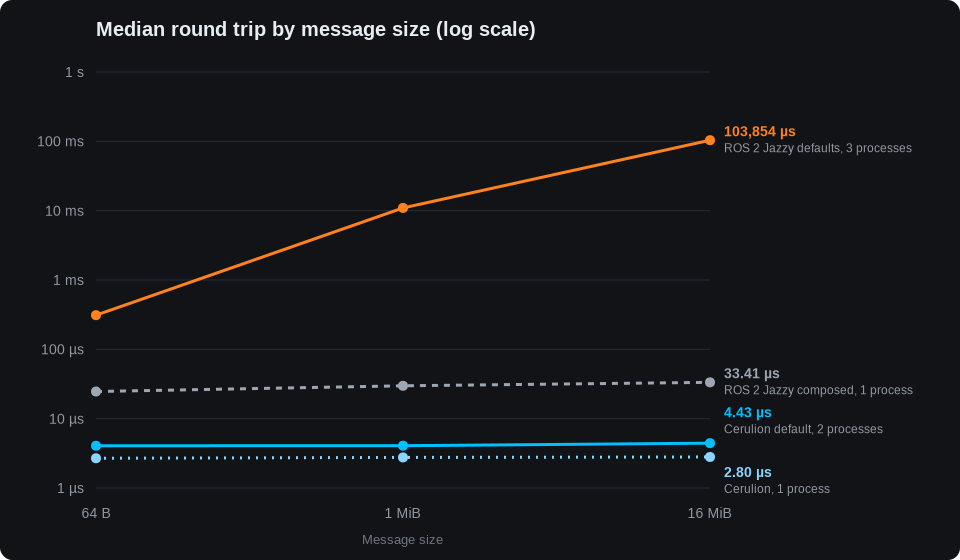
Median round trip against message size, log scale. One Linux x86-64 desktop, 100 Hz, recording on, Sep 2026, from the native results package.
If you move camera or lidar data between processes, try the transport on your own machine, with two nodes in two processes and no robot.
Why is ROS 2 slow for large messages between processes?
ROS 2 Jazzy defaults are slow for large messages between processes because the default transport serializes and copies every message, so the cost grows with the payload. Their median round trip read 311 µs at 64 B, 10,952 µs at 1 MiB and 103.9 ms at 16 MiB, on that desktop at 100 Hz, Sep 2026.
Picture a depth camera on a robot that publishes a 1 MiB frame at 100 Hz, which is the load in this benchmark. A new frame leaves every 10 ms. On Jazzy defaults the round trip took 10,952 µs. The reply to frame one is still in flight when frame two leaves.
The defaults lane is ros2 run on Jazzy with no configuration, which means rmw_fastrtps_cpp, one process per node, plain publish() and a typed callback. Every receive pays a heap allocation and a copy of the payload. Our walkthrough of how the ROS 2 DDS layer moves a message traces each step.
ROS 2 has its own fast path, and Nav2 ships composed bringup by default. Compose the nodes into one process and turn on intra-process communication, so they hand over a pointer. At 1 MiB that lane reads 29.79 µs, by median in the same benchmark. The cost is in the name: one process.
Between processes, shared memory alone is not the fix. The Jazzy defaults already include a shared memory transport, in Fast DDS under rmw_fastrtps_cpp, and it is copy-based. Fast DDS also has a zero-copy mode, called DataSharing, which the Jazzy defaults leave off and which needs plain, bounded types.
Do ROS 2 loaned messages work for Image and PointCloud2?
ROS 2 loaned messages do not give sensor_msgs/Image or sensor_msgs/PointCloud2 a zero-copy path on rmw_fastrtps_cpp, the Jazzy default. A loaned message is one the publisher borrows from the transport and fills in place. The loan needs a plain old data (POD) type, which means a fixed size with no variable-length fields. Image carries an unbounded data array, and point clouds such as PointCloud2 are unbounded types too.
ROS 2's loaned-message API asks the transport layer (the RMW) whether it can loan the type, and every stock RMW that implements loans refuses a type that is not plain. On the stock RMWs, an unbounded type such as sensor_msgs/Image cannot be loaned, so it takes the copy path.
So the loan path fits fixed-size types. The large messages on a robot are the ones it leaves out.
Cerulion's zero-copy transport loans variable-length messages. In this benchmark the Cerulion nodes carry sensor_msgs/Image and loan its data field on every tick. The ROS 2 lanes carry a fixed-size POD message, the shape a loan likes best.
How do I get low latency without putting every node in one process?
Low latency without one shared process needs a transport that passes a reference instead of a copy.
Follow one 1 MiB frame through Cerulion, from a camera node to a perception node, each in its own process:
- The camera node borrows a slot in shared memory from the transport and writes the frame into it, once.
- Publishing passes the perception node a reference to that slot. The bytes stay where they are.
- The perception node's process wakes and reads the frame in place, with no serialize, no deserialize and no copy on the receive path.
What crosses the process boundary is a reference and a wake-up, and neither grows with the frame. That is why 64 B and 16 MiB cost about the same in this benchmark, 4.07 µs and 4.43 µs at the median.
CI holds the transport to that. flat_latency_test times one-way publish to receive, fill excluded, at five sizes from 1 KiB to 16 MiB. It fails if, across those five sizes, the slowest takes more than 1.5 times as long as the quickest, with one outlier dropped. zero_alloc_test fails on a heap allocation in the subscriber's receive path.
Cerulion's transport is built on iceoryx2, which does the shared memory work. Cerulion adds nodes, scheduling and recording on top, and runs each node in its own process by default.
So the decision for large messages changes. You no longer trade process isolation for speed. Keep each node in its own process, and let the transport carry the frame by reference.
How fast is a shared-memory round trip for a 1 MiB message?
A 1 MiB shared-memory round trip on Cerulion took 4.08 µs at the median and 7.38 µs at p99, between processes on one Linux desktop at 100 Hz. The median is p50, and p99 is the time that 99 of 100 round trips beat.
How we measured
- What ran. Three nodes pass one message around and time the round trip. Cerulion runs them in two processes (one timed crossing), ROS 2 Jazzy defaults in three processes (two timed crossings) and the composed lane in one.
- How many times. Each lane ran five times, with 2,000 timed round trips per size after 100 warm-up trips.
- Machine, load and date. The machine is one x86-64 Linux desktop (24-core Intel Core Ultra 9 285K, performance governor, no real-time tuning), at 100 Hz, on 2026-09-16. One machine, not a guarantee.
- ROS 2 setup. ROS 2 runs as Jazzy ships it, on
rmw_fastrtps_cppdefaults, with its own fast path, the composed lane, beside it. - What is timed. The benchmark times the transport round trip only, with Cerulion's recording on. No payload byte is written inside the timed window.
Read along each row of the table to see what message size does to the median.
| Median round trip | 64 B | 1 MiB | 16 MiB |
|---|---|---|---|
| Cerulion, multi-process (default) | 4.07 µs | 4.08 µs | 4.43 µs |
| Cerulion, single process | 2.69 µs | 2.76 µs | 2.80 µs |
| ROS 2 Jazzy, composed, one process | 24.64 µs | 29.79 µs | 33.41 µs |
ROS 2 Jazzy, rmw_fastrtps_cpp defaults | 311 µs | 10,952 µs | 103.9 ms |
Both Cerulion rows stay flat from 64 B to 16 MiB, and the ROS 2 defaults row climbs from 311 µs to 103.9 ms. One process against one process, the middle rows read 2.76 µs for Cerulion single-process and 29.79 µs for composed ROS 2 at 1 MiB. Every figure is in the native results package, and the interactive benchmarks page lets you change the payload and compare the four process layouts side by side.
The tail holds too. Cerulion's multi-process p99 reads 6.61 µs at 64 B, 7.38 µs at 1 MiB and 10.45 µs at 16 MiB, in the same runs.
Rerun the benchmark on your machine
Evaluators, this route is for you. One script drives the public suite in benches/latency. In a clone of the repository, on Linux with Rust, Python 3 with matplotlib, and Docker:
cd benches/latency
python3 bench.py list-cells
CER_BENCH_DMA_LOCK=0 python3 bench.py full --variant fixed100 --chrt both --build-image --reps 5
list-cells prints the cells your machine would run. full writes the raw round-trip samples, percentile CSVs, plots and a run.json manifest of the machine. --variant fixed100 and CER_BENCH_DMA_LOCK=0 match the uniform 100 Hz, stock-host run quoted here. The ROS 2 cells take hours, unattended.
Can existing ROS 2 Jazzy nodes use the same transport?
Existing ROS 2 Jazzy nodes on Linux can use the same transport through rmw_cerulion, the bridge that runs stock nodes on Cerulion's shared memory and records them. Your nodes keep their APIs, executors and source, and they get zero-copy for the messages they loan.
On the same desktop at 100 Hz, Jazzy nodes on rmw_cerulion using loaned messages read 11.12 µs at the median and 37.21 µs at p99 for 1 MiB. Taking loans on Jazzy needs ROS_DISABLE_LOANED_MESSAGES=0, and without loans rmw_cerulion copies. On rmw_fastrtps_cpp defaults the same two figures read 10,952 µs and 43,402 µs. Both lanes ran three nodes in three processes with a fixed-size message, on the same desktop and benchmark, the rmw_cerulion lane on 2026-09-18.

Ten sizes, medians with p50 to p99 bands, including Jazzy on rmw_cerulion. Same desktop, 100 Hz, Sep 2026, from the rmw_cerulion results package.
On hardware, a six-axis industrial arm ran MoveIt 2 on rmw_cerulion on 2026-08-18. Cerulion has also run on an NVIDIA Jetson Orin NX in Sep 2026 and an Apple M4 in Nov 2026, each with a public latency package. The compatibility page shows what ROS 2 nodes keep on rmw_cerulion.
What else comes with the transport?
The transport comes with an always-on recorder and a replay check for native nodes on one machine. Flashback, the recorder, keeps about the last 30 seconds in memory and writes them to disk on a runtime fault, such as a worker process dying. Every native Cerulion figure in this post includes it. The replay check re-executes a recorded run against your current code and compares each output with the recording.
Exit 0 means the outputs match the recording to the tolerance you set. Change one constant and it exits 1 with the topic, frame and field.

A real run on Cerulion 2.1.0, which ends on differs at x: recorded 0.3, replayed 0.25.
Try the zero-copy transport with no robot
No robot needed. If you write robot code, this runs two nodes in two processes on your machine and passes messages between them through shared memory.
- You need: Linux or macOS,
curl, a C toolchain and a Cerulion account (cerulion login). No ROS 2. - Download size: the Cerulion CLI, 2.1.0 or later, and Rust if you lack it. No simulator to download.
- Time: a fresh build takes a few minutes.
curl -fsSL https://raw.githubusercontent.com/cerulion-inc/cerulion/main/tools/scripts/install.sh | sh && . "$HOME/.cerulion/env"
cerulion login
cerulion workspace create safety_demo --starter obstacle_avoidance
cd safety_demo
cerulion node build laser_scanner --release
cerulion node build safety_controller --release
cerulion graph run obstacle_avoidance --release --record --network off
A good run prints this line, for a synthetic laser scanner and a safety controller.
graph 'obstacle_avoidance' running: 2 node(s) in 2 process(es); press Ctrl+C to stopTo watch messages arrive, run this in a second terminal in safety_demo. Stop it before you stop the run.
CERULION_NETWORK=off cerulion topic echo /obstacle_avoidance/safety_controller/linear_velocityAfter five seconds or so, press Ctrl+C in the run's terminal. The run was recorded, so check it against the same code.
BAG=$(ls -t recordings/*.mcap | head -n 1)
cerulion bag play "$BAG" --resim all --verify
replay PASS: recordings/obstacle_avoidance_<time>.mcap (<n> tick(s) replayed, 2/2 topic(s) matched byte-for-byte and were credited)Then change the clear-path speed from 0.3 to 0.25, rebuild and replay. The check exits 1 with differs at x: recorded 0.3, replayed 0.25.
perl -pi -e 's/else \{ 0\.3 \}/else { 0.25 }/' nodes/safety_controller/src/lib.rs
cerulion node build safety_controller --release
cerulion bag play "$BAG" --resim all --verify
Already on ROS 2 Jazzy? On Linux, after the install line above, source /opt/ros/jazzy/setup.bash && cerulion ros2 run demo_nodes_cpp talker runs a stock talker on the same transport, with no account. If demo_nodes_cpp is missing, run sudo apt-get install ros-jazzy-demo-nodes-cpp before that.
Agent builders: the harness, Cerulion's tools that let an LLM see and move a simulated robot arm, runs on this runtime. Read our results for 16 LLMs on LIBERO-PRO, a benchmark of simulated robot manipulation tasks.
Evaluators: star the Cerulion repository to keep the benchmark suite, both results packages and the code behind every figure one click away.
ROS 2 teams with large messages: book a demo, bring your message sizes and your graph, and talk to the founders about your latency.
Sources
- Native latency results package, 2026-09-16
rmw_cerulionlatency results package, 2026-09-18- Latency benchmark suite and its methodology
- Cerulion performance notes
- Cerulion README, latency table and runtime trial
- Latency package for the NVIDIA Jetson Orin NX and for the Apple M4
- ROS 2 Jazzy guide to zero-copy loaned messages
- ROS 2 Jazzy composition guide
- Fast DDS zero-copy communication
- iceoryx2
sensor_msgs/Imageandsensor_msgs/PointCloud2message definitions